Can PhotoCraft and FilmCraft Replace Photoshop and Premiere?
ArtCraft's open-source Adobe alternatives look promising. A studio view on PhotoCraft, FilmCraft and what professionals need before switching.
In this article
A client can reject a beautiful image because the product colour is wrong. They rarely reject it because the artist used the wrong brand of software.
That is why ArtCraft’s PhotoCraft and FilmCraft deserve more than a passing look. Free, open-source alternatives to Photoshop and Adobe Premiere Pro could give artists and studios more choice over how they work. The interesting part is what happens after the download: can those tools carry a project through revisions, handoff and final delivery?
Our view at Kimagination leans towards yes. Open-source software can replace commercial creative tools in professional workflows, and we expect more professionals to adopt it where it meets their needs. PhotoCraft and FilmCraft still have to earn that trust. Their early status matters, even if the direction is encouraging.
This is a source-based studio perspective, not a hands-on benchmark. We reviewed ArtCraft’s product pages and project documentation on 6 November 2026, alongside independent reporting. We have not tested these apps on client production or claimed a studio-wide switch.
What are PhotoCraft and FilmCraft?
ArtCraft’s Crafting Apps are free, open-source creative applications. PhotoCraft targets image editing; FilmCraft targets video editing. ArtCraft also has a separate AI image and video product, ArtCraft Studio. Do not assume the free desktop editors and every hosted AI service have identical pricing or terms.
PhotoCraft is the Photoshop alternative. Its documentation lists layers, masks, adjustment layers, editable type, brushes and layered PSD support. The official product page labels it early alpha. Those are promising foundations for retouching and compositing, but a feature list does not establish how a complicated campaign file will behave.
FilmCraft is the Premiere Pro alternative. Its documentation describes a multitrack timeline, familiar trimming operations, colour tools, titles, audio mixing and export. The product page says in development, and the repository calls it alpha software.
Both repositories advertise a choice of MIT or Apache-2.0 licensing. That is different from a proprietary app that happens to offer a free tier. It also does not settle the rights to footage, fonts, plugins or any assets used inside a project.
The attention is understandable. PetaPixel’s October report introduced the project to photography readers, while CineD examined the video tools and their limitations. Neither excitement nor a familiar interface is a substitute for production testing.
Can PhotoCraft replace Photoshop for professional work?
PhotoCraft is a credible candidate to evaluate for specific image-editing tasks. Calling it a complete Photoshop replacement today would go further than the evidence supports.
The PhotoCraft repository documents PSD opening and saving, adjustment layers and colour-management features. Those capabilities matter because professional image work often depends on an editable document rather than a finished JPEG. An agency might need to change a headline next month. A retoucher may need the original masks and colour adjustments.
For a self-contained image, the transition could be fairly manageable once the app passes the relevant checks. For a shared PSD with complex smart objects, unusual fonts or a plugin-dependent finish, the handoff deserves much closer inspection. Supporting a format does not mean reproducing every document perfectly.
Take product imagery. A convincing glass reflection is useful only if the bottle still has the right shape and the packaging remains readable. We would compare fine edges, transparency and approved colour values, then reopen the delivered file in the recipient’s software. A small shift in a label can matter more than a long list of supported filters.
This is the same accuracy problem we discuss in our guide to brand consistency and product imagery. The standard belongs to the work, whichever application produced it.
Can FilmCraft replace Premiere Pro?
For selected, independently managed edits, FilmCraft could become a practical alternative. Replacing Premiere in an established team is a harder job because the timeline sits inside a larger production process.
The FilmCraft README’s status section makes several current limitations explicit: it cannot open native Premiere .prproj files, it lacks VST3, Audio Units and OpenFX plugin hosting, and real-world media and platform testing remain gaps. The project documents interchange routes such as XML, AAF and OpenTimelineIO. These can help move work, but they should not be treated as a guarantee that every effect or edit will survive unchanged.
That distinction changes the switching decision. An artist making a new short product film has more freedom than an editor inheriting a large Premiere project with years of associated media and plugins. A client who only needs approved final exports has different requirements from an agency that needs an editable Premiere timeline.
A sensible trial would use the actual camera files or rendered sequences, fonts and audio intended for the job. Check playback, colour, export and a later revision. Reopen the project on another workstation. Test the handoff before promising it to someone else.
For product animation, creative decisions still start before the edit: what needs to move, what the viewer should notice and how long each shot needs to hold. Our animation briefing guide covers that preparation. A more accessible editor can help execute the plan; it cannot supply a good plan by itself.
Why professionals will gradually switch
We expect adoption to happen task by task, rather than through one dramatic industry announcement. A studio might first try a new editor on an internal piece, then a self-contained delivery, and only later consider shared production files. That is our expectation, not a measured adoption forecast.
The economics help. Removing a licence cost makes experimentation easier for an independent artist or a small team. Lower costs can also make it easier to keep an extra workstation available. But a free app stops being cheap if someone spends a day repairing a broken export.
Open source offers another reason to pay attention: the option to inspect, modify or commission changes to software. Most artists will never edit the code themselves. They can still benefit from a fix that a contributor or specialist develops. Long-term maintenance, accessible documentation and dependable releases will determine how useful that option becomes.
There is already a concrete example in 3D. Blender Studio produces films and maintains open-source production tools while feeding experience back into Blender’s development. That does not prove ArtCraft will follow the same path. It does show that open-source development and serious creative production can support each other.
We would welcome a future with more viable choices. A professional should be able to choose software because it fits the job, rather than because every other route makes file exchange unnecessarily difficult.
What a studio should test before switching
A weekend experiment and a client delivery need different levels of caution. Before moving paid work, define what a successful result looks like and test a copy of a representative project.
- Check the final image or film. Compare colour, fine detail, transparency and export settings against the approved reference. Judge the delivered file, not just the preview inside the app.
- Check editability. Save, close and reopen. Change the text, revise a mask or replace a shot. Confirm that a second artist can continue the work.
- Check the exchange with other tools. Test PSD or timeline interchange in both directions where the project needs it. Record what changes or gets flattened.
- Check a failure and recovery. Confirm backups, autosave and relinking behaviour. Keep an untouched source copy and a working route back to the established application.
- Check the business requirements. Review the software licence, any connected services, asset rights and the client’s required source format. Open source is not a blanket permission for everything used in an image.
Keep the initial test small enough that a failed result costs an afternoon rather than a delivery deadline. If it passes, widen the trial. If it fails, send a useful bug report and keep the application under review.
Creativity remains the professional advantage
Put the same bottle in front of two artists using the same software and you will not get the same image. One may place a reflection that reveals its shape. Another may bury the label in glare. The tool gives both artists controls; judgment determines how they use them.
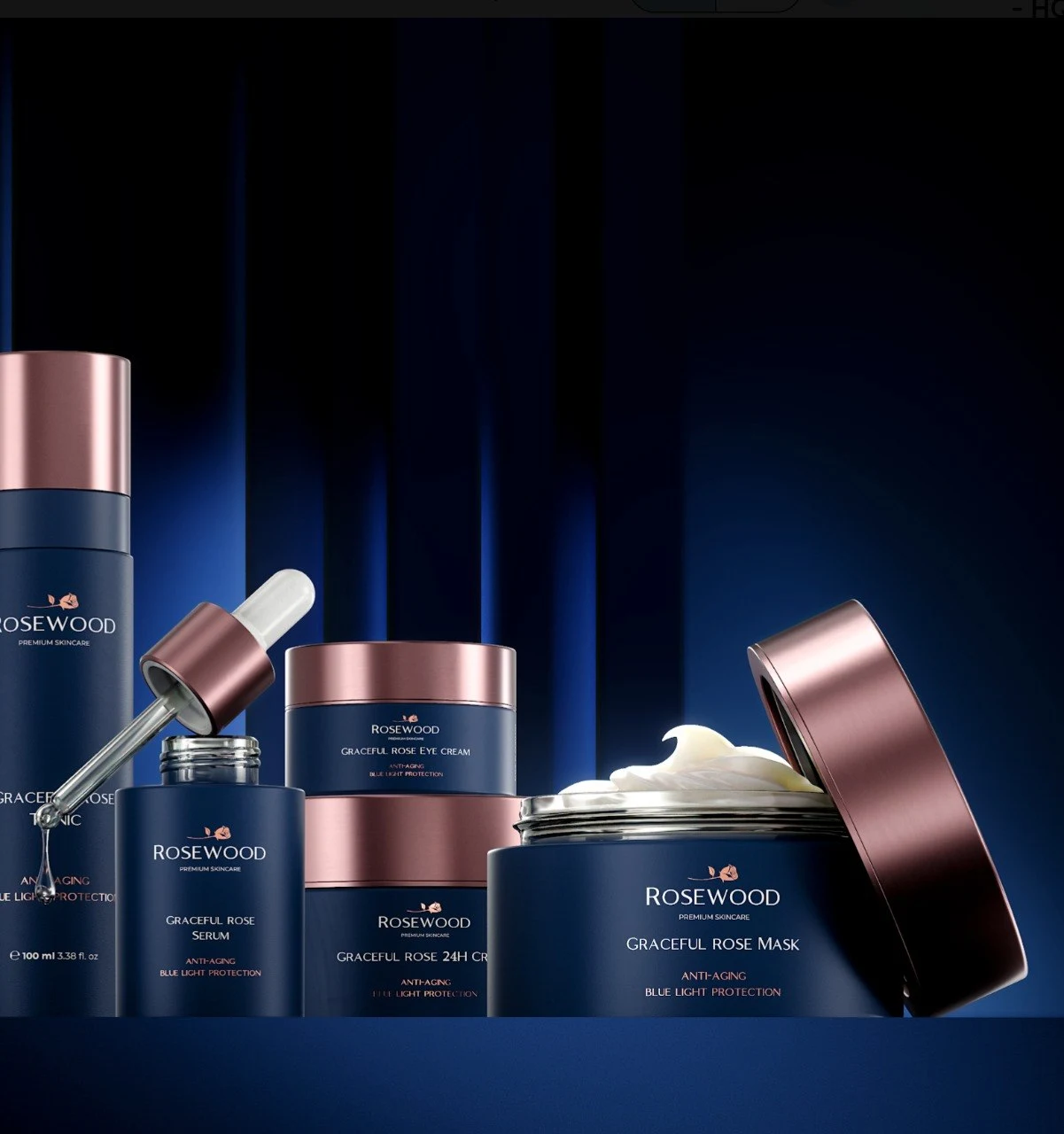
In the Rosewood product imagery, for example, the relationship between navy packaging, reflective closures and light is something a viewer can assess directly. We link the work as a visual reference, not as evidence that PhotoCraft or FilmCraft was used to make it.
At Kimagination, we care about the image we can stand behind. That includes accurate products, deliberate lighting and a result that holds up across the required formats. We are willing to use any software that brings us closer to that standard, open source or commercial. A new tool earns its place when it gives us useful control without making the delivery less dependable.
So yes, we think open-source tools can take on more professional creative work. Some already do. ArtCraft’s apps are worth watching and testing, while their current limitations deserve an honest reading. We do not need to declare Photoshop or Premiere finished to be enthusiastic about having alternatives.
If you are commissioning product CGI or a launch film, start with the result your audience needs to see. Talk to Kimagination about the brief. We will choose the tools around the work.
Sources and further reading
Product claims and development status can change quickly. These are the sources used for this article:
- ArtCraft: the Crafting Apps, with links to the official product pages and downloads.
- PhotoCraft source and documentation, including its PSD and colour-management claims and early-alpha label.
- FilmCraft source and status, including native-project, plugin and media-testing limitations.
- PetaPixel’s introduction to ArtCraft, published 7 October 2026.
- CineD’s examination of FilmCraft and EffectCraft, published 12 October 2026. Its release-specific details should be read in their original date context.
- Blender Studio’s production and development goals, an established example of open-source tools connected to creative production.
From insight to practice
Explore the work
Need product visuals for a real project?
Show us what you have and what the images need to accomplish.
Discuss your project